
Workday Release 2026R2 Update
The following contains information regarding some of the changes from Workday Release 2026R2 that went live on September 19, 2026. Please access the recorded webinar regarding the 2026R2 Updates for more details.
New Global Navigation Menu
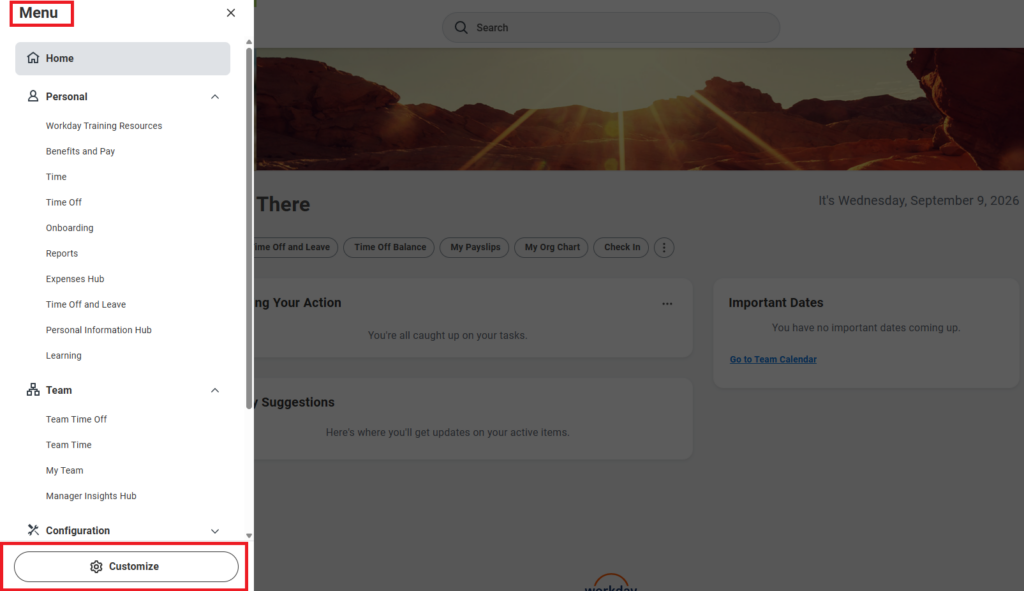
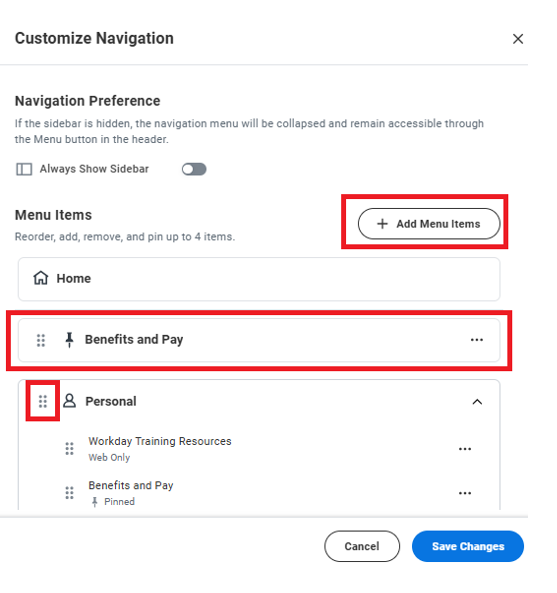
Workday has enhanced the global navigation menu by introducing Workday-defined navigation categories, improving personalization and the overall navigation experience for users.
Workday automatically assigns menu items to relevant categories, such as Payroll, Personal, Learning Management, Organization, and Team. Within each category tab, users can reorder, and remove menu items from their Apps tab, all within the same category.
Global Navigation Features
- Sidebar or Collapsible Menu View: Users can choose between a Side Bar view or a Collapsible Category Menu. If the sidebar is hidden, the navigation menu collapses but remains accessible via the Menu button in the header.
- Add Menu Items: Users can add menu items within each category.
- Mandatory Apps Retained: Previously configured mandatory apps continue to apply and cannot be removed.
- Role-Based Apps: Available apps are still determined by the user’s assigned roles.
- Reorganize Apps and Categories: Users can reorder apps within a category, as well as reorder categories within the menu.
- Default Category Placement: Personal and Team categories are defaulted to the top of the menu.
- Default Training Resource Placement: Workday Training Resources are defaulted to the top of the Personal category.
- Favorites: Favorites are now accessible from the View All Saved link in the Global Navigation Menu, or under the Profile icon. The worklet/app is being deprecated.
- Pin Apps: Users can pin up to 4 apps to the top of the menu for quick access.
- Reset to Default: Users can reset the menu back to its default configuration at any time.
Filter and Column Management for Tables with Hidden Columns
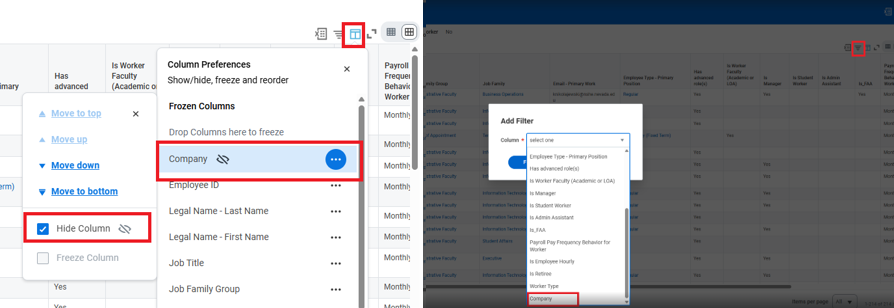
Users can now filter table data using hidden columns. They can easily access and override system-delivered hidden columns to make them visible on their table.
This update decouples filtering from data visibility, allowing you to filter by hidden columns. This keeps your tables clean, eliminates unnecessary horizontal scrolling, and reduces cognitive load – without losing the analytical power of your data.
Improvements to Change Job Initiation
Workday improved the user experience when a user initiates a Change Job. This feature reduces unnecessary or accidental in-progress Change Job events, The Change Job workflow is simplified by:
- Displaying the main Change Job business process workflow page.
- Dynamically displaying relevant subprocesses after users click the Next button.
- Waiting to create an in-progress Change Job event until after the user completes the subprocesses and clicks Submit.
- For a Request Transfer initiated through Recruiting: Display the Revise Job Change event in the user’s inbox as view-only with a Make Changes button.
Display a warning message when selecting a worker who isn’t a manager in the Who will be this person’s manager after the move? field. A Move to New Manager button is available to proceed. (This feature isn’t available in mobile)
Miscellaneous Enhancements
Team Highlights Updates – Managers No longer see the Team Highlights section on their Workday home page.
Filter and Column Management for Tables with Hidden Columns – Users can now filter table data using hidden columns. They can easily access and override system-delivered hidden columns to make them visible on their table.
Export Report Writer Charts as PNG – User can now download and export charts directly from your Report Writer reports and dashboard worklets as PNG images. You can save, reuse, and share your report visualizations in external presentations, emails, and offline documents without having to manually recreate them.
Report Processing Time Estimates on Notify Me Later – Workday now provides dynamic estimates of how long reports take to run. When running supported reports directly in Workday, you can now view estimated completion times and status updates in real time. Estimated completion times are approximate and may not be precise for all eligible reports.
Newsletters
Introducing Grants Management Dashboard
Update Your Beneficiary for Unpaid Compensation
Customer Alerts
- Inbox Filter Navigation Issue
- Task Count Not Displaying for Some Users in Header
- Unexpected Behavior with Project Filters in Custom Reports and Integrations
- Workday Dashboards: May Show Partial Results and No Scroll Bar
- Resolved- Workday Case – Some Users Cannot Logging, system is running slow
- Resolved – Production Tenants Unavailable – WD1 Data Center
- Resolved-Production Tenants Unavailable – WD1 Data Center